# 7.0 Colorsetting Guide

<span style="font-size: 11pt; font-family: Arial,sans-serif; color: #000000; background-color: transparent; font-weight: 400; font-style: normal; font-variant: normal; text-decoration: none; vertical-align: baseline; white-space: pre-wrap;">This guide covers how to colorset and what material shaders do/don’t work on gear. It’s an attempt to explain all the new additions to Dawntrail, especially with how to get the cute metal/glass/velvet looks. </span>

<span style="font-size: 11pt; font-family: Arial,sans-serif; color: #000000; background-color: transparent; font-weight: 400; font-style: normal; font-variant: normal; text-decoration: none; vertical-align: baseline; white-space: pre-wrap;">Most of this guide is written specifically for Penumbra, as Penumbra’s color setting is far easier to use and beginner-friendly, in my opinion. I’ll cover how to access the TexTools colorsets, but beyond that, this guide is only for Penumbra. </span>

<span style="font-size: 11pt; font-family: Arial,sans-serif; color: #000000; background-color: transparent; font-weight: 400; font-style: normal; font-variant: normal; text-decoration: none; vertical-align: baseline; white-space: pre-wrap;">Additionally, this guide is how I’ve learned to use these shaders. There are different, and most likely easier ways, to do these, but this is how I do it. </span>

# <span style="font-size: 20pt; font-family: Arial,sans-serif; color: #000000; background-color: transparent; font-weight: 400; font-style: normal; font-variant: normal; text-decoration: none; vertical-align: baseline; white-space: pre-wrap;">Colorsets</span>

<span style="font-size: 11pt; font-family: Arial,sans-serif; color: #000000; background-color: transparent; font-weight: 400; font-style: normal; font-variant: normal; text-decoration: none; vertical-align: baseline; white-space: pre-wrap;">As covered in the previous guide, Indexes control where the colorset rows are placed now, instead of the normal’s alpha. Colorsets are broken down into four main components: </span>

- <span style="font-size: 11pt; font-family: Arial,sans-serif; color: #000000; background-color: transparent; font-weight: 400; font-style: normal; font-variant: normal; text-decoration: none; vertical-align: baseline; white-space: pre-wrap;">Diffuse: The base color of your colorset row. This will appear as a flat color.</span>
- <span style="font-size: 11pt; font-family: Arial,sans-serif; color: #000000; background-color: transparent; font-weight: 400; font-style: normal; font-variant: normal; text-decoration: none; vertical-align: baseline; white-space: pre-wrap;">Specular: The shading on your diffuse. The brighter this is, the shinier your color will appear. The darker this is, the more matte your color will appear.</span>
    - <span style="font-size: 11pt; font-family: Arial,sans-serif; color: #000000; background-color: transparent; font-weight: 400; font-style: normal; font-variant: normal; text-decoration: none; vertical-align: baseline; white-space: pre-wrap;">Gloss also controls how shiny your color will appear. I don’t usually mess with this, but I figured I’d include it.</span>
- <span style="font-size: 11pt; font-family: Arial,sans-serif; color: #000000; background-color: transparent; font-weight: 400; font-style: normal; font-variant: normal; text-decoration: none; vertical-align: baseline; white-space: pre-wrap;">Emissive: The easiest way to make things glowy! </span>
- <span style="font-size: 11pt; font-family: Arial,sans-serif; color: #000000; background-color: transparent; font-weight: 400; font-style: normal; font-variant: normal; text-decoration: none; vertical-align: baseline; white-space: pre-wrap;">Dye: Which channel the dye appears on; Dye channel 1 or Dye channel 2! </span>
    - <span style="font-size: 11pt; font-family: Arial,sans-serif; color: #000000; background-color: transparent; font-weight: 400; font-style: normal; font-variant: normal; text-decoration: none; vertical-align: baseline; white-space: pre-wrap;">Dye Preview: This will show what your preview dye will look like.  

        </span><span style="font-size: 11pt; font-family: Arial,sans-serif; color: #000000; background-color: transparent; font-weight: 400; font-style: normal; font-variant: normal; text-decoration: none; vertical-align: baseline; white-space: pre-wrap;"><span style="border: none; display: inline-block; overflow: hidden; width: 624px; height: 17px;">![](https://lh7-rt.googleusercontent.com/docsz/AD_4nXe10uXwyY208FyYEm6GoCJ7Kps_9BgQ2qptIh0sxOiZfpHUfnVyZt_gOycVctwamcDEjpZZIudQ75VzmXqrzmZ4QmpH6MKgoauPY1HeqVS9LkrUGo73pE5YvvClBlJaFhIQt1bqWrVeRjUjEdyZ?key=-yowPvpdJ5vtGqEUkSfukw)</span></span>
- <span style="font-size: 11pt; font-family: Arial,sans-serif; color: #000000; background-color: transparent; font-weight: 400; font-style: normal; font-variant: normal; text-decoration: none; vertical-align: baseline; white-space: pre-wrap;">I won’t focus on the Tile/Repeat /Skew since I also don’t mess with those! </span>

### <span style="font-size: 13.999999999999998pt; font-family: Arial,sans-serif; color: #434343; background-color: transparent; font-weight: 400; font-style: normal; font-variant: normal; text-decoration: none; vertical-align: baseline; white-space: pre-wrap;">TexTools Colorsetting</span>

<span style="font-size: 11pt; font-family: Arial,sans-serif; color: #000000; background-color: transparent; font-weight: 400; font-style: normal; font-variant: normal; text-decoration: none; vertical-align: baseline; white-space: pre-wrap;"><span class="Apple-tab-span" style="white-space: pre;"> </span></span><span style="font-size: 11pt; font-family: Arial,sans-serif; color: #000000; background-color: transparent; font-weight: 400; font-style: normal; font-variant: normal; text-decoration: none; vertical-align: baseline; white-space: pre-wrap;">Your TexTools colorsets are located under the Materials tab. Click on the drop down box, then to the material you’d like to change. </span><span style="font-size: 11pt; font-family: Arial,sans-serif; color: #000000; background-color: transparent; font-weight: 400; font-style: normal; font-variant: normal; text-decoration: none; vertical-align: baseline; white-space: pre-wrap;"><span style="border: none; display: inline-block; overflow: hidden; width: 624px; height: 71px;">![](https://lh7-rt.googleusercontent.com/docsz/AD_4nXddNIFROcDboUbMMDi5PNTAmqkQx1_g9tcd8qnN5fESrqJ2d9u7dQsVwbeiMJ1YIORBePOMYu2NL781CTO-2ammzEQWX3VbFgzvcsE_zBrN-n_b8xLGjz46SWr9RSqXvweEYiL4gJoI7LcNym-gUw?key=-yowPvpdJ5vtGqEUkSfukw)</span></span>

- <span style="font-size: 11pt; font-family: Arial,sans-serif; color: #000000; background-color: transparent; font-weight: 400; font-style: normal; font-variant: normal; text-decoration: none; vertical-align: baseline; white-space: pre-wrap;">From here, click “View / Edit Colorset.” </span><span style="font-size: 11pt; font-family: Arial,sans-serif; color: #000000; background-color: transparent; font-weight: 400; font-style: normal; font-variant: normal; text-decoration: none; vertical-align: baseline; white-space: pre-wrap;"><span style="border: none; display: inline-block; overflow: hidden; width: 624px; height: 55px;">![](https://lh7-rt.googleusercontent.com/docsz/AD_4nXctRsNwNJ2UmBy4d359QqWTqJAJFyxIbK_yhvDjEojEdtkf6hYCoP-0nqVpCFTEWhMB4KiLyPO8vX_SfTgnoCXRzrMGmT_zFvkP1xBpLIE6fUDXyY22uFIXMtJp2MDHYI_tznX8Fud7JkgqwzAy?key=-yowPvpdJ5vtGqEUkSfukw)</span></span>

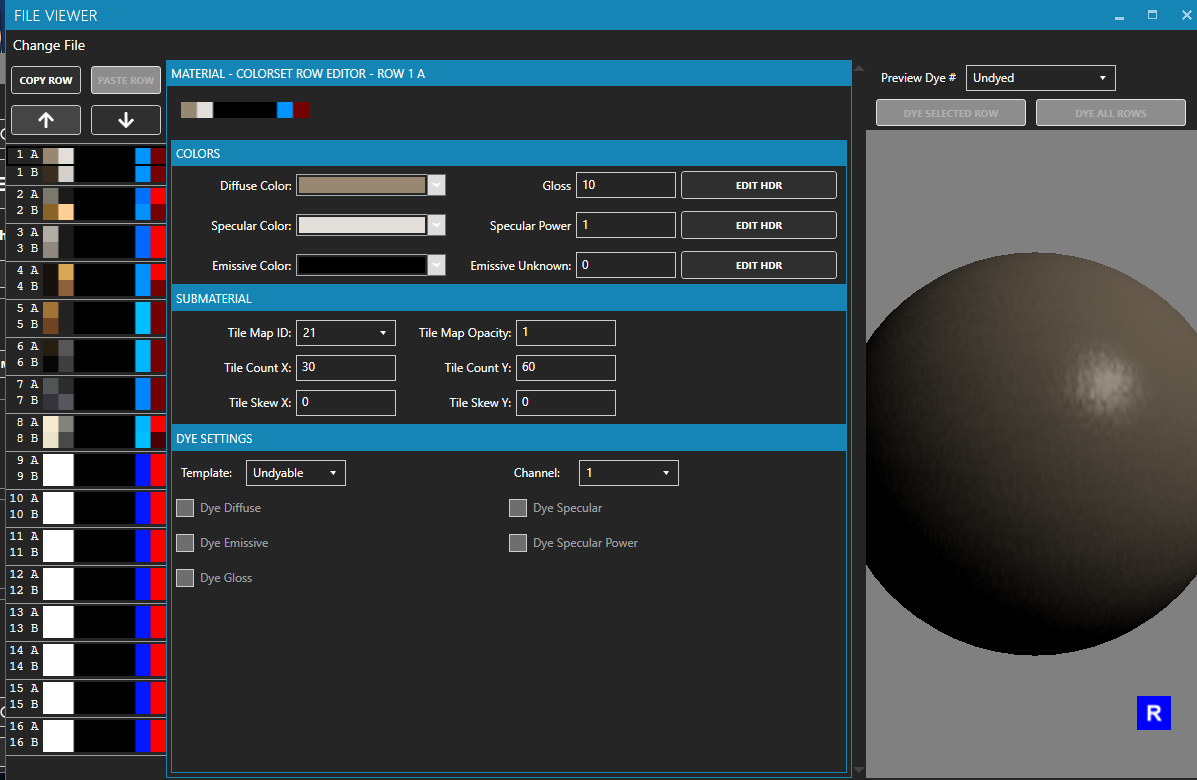
- <span style="font-size: 11pt; font-family: Arial,sans-serif; color: #000000; background-color: transparent; font-weight: 400; font-style: normal; font-variant: normal; text-decoration: none; vertical-align: baseline; white-space: pre-wrap;">This will bring up this window!</span><span style="font-size: 11pt; font-family: Arial,sans-serif; color: #000000; background-color: transparent; font-weight: 400; font-style: normal; font-variant: normal; text-decoration: none; vertical-align: baseline; white-space: pre-wrap;"><span style="border: none; display: inline-block; overflow: hidden; width: 587px; height: 384px;">![](https://lh7-rt.googleusercontent.com/docsz/AD_4nXcm4GcjfOSrjMbHUvJ6QW9SkcuvYY8GY9CTaEa7U5RyDy5toaLDpKxFPswG8NDi186YfMB9b-1mTQ8qJGzstXAKJY9jy6bMz26k5JZY5LYna3edRocc6SHC39PsCJfIwCEFW2cet8wIP-0QyKRvkg?key=-yowPvpdJ5vtGqEUkSfukw)</span></span>
- <span style="font-size: 11pt; font-family: Arial,sans-serif; color: #000000; background-color: transparent; font-weight: 400; font-style: normal; font-variant: normal; text-decoration: none; vertical-align: baseline; white-space: pre-wrap;">The first 3 squares are your Diffuse, Specular, and Emissive. You can see the color previews there. </span>
- <span style="font-size: 11pt; font-family: Arial,sans-serif; color: #000000; background-color: transparent; font-weight: 400; font-style: normal; font-variant: normal; text-decoration: none; vertical-align: baseline; white-space: pre-wrap;">In the middle, you can change your dye template, gloss, dye channel, and what’s dyed. </span>
- <span style="font-size: 11pt; font-family: Arial,sans-serif; color: #000000; background-color: transparent; font-weight: 400; font-style: normal; font-variant: normal; text-decoration: none; vertical-align: baseline; white-space: pre-wrap;">On the right side, you can see what your material will look like undyed / dyed! </span>
- <span style="font-size: 11pt; font-family: Arial,sans-serif; color: #000000; background-color: transparent; font-weight: 400; font-style: normal; font-variant: normal; text-decoration: none; vertical-align: baseline; white-space: pre-wrap;">To find your colorset rows, we’ll move back to the model tab! </span><span style="font-size: 11pt; font-family: Arial,sans-serif; color: #000000; background-color: transparent; font-weight: 400; font-style: normal; font-variant: normal; text-decoration: none; vertical-align: baseline; white-space: pre-wrap;"><span style="border: none; display: inline-block; overflow: hidden; width: 562px; height: 316px;">![](https://lh7-rt.googleusercontent.com/docsz/AD_4nXffBeJt4Iw4UhZ0qDikR9W7EECLufym4eRN7JEe3KgDOGZxAtnrb-Nv4bx44DjKcSlQKbTGwpYDvcJwwDgD_9POPQrVpaiyGted9aciGZ4J_nhSrwld017MVIPFy-rfPa4coW4pjwfGAkdAl2gg?key=-yowPvpdJ5vtGqEUkSfukw)</span></span>
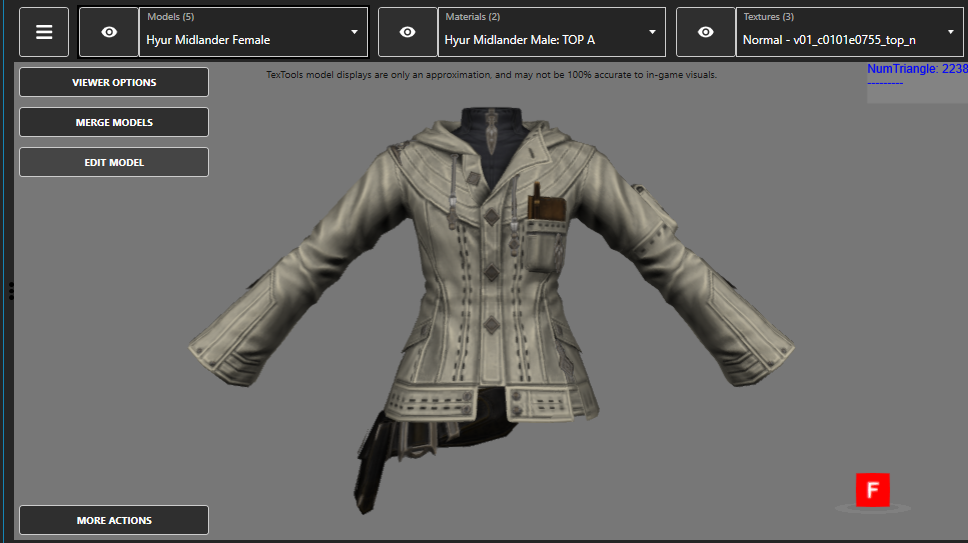
- <span style="font-size: 11pt; font-family: Arial,sans-serif; color: #000000; background-color: transparent; font-weight: 400; font-style: normal; font-variant: normal; text-decoration: none; vertical-align: baseline; white-space: pre-wrap;">We’re looking for “View Options” in the top left.   
    </span><span style="font-size: 11pt; font-family: Arial,sans-serif; color: #000000; background-color: transparent; font-weight: 400; font-style: normal; font-variant: normal; text-decoration: none; vertical-align: baseline; white-space: pre-wrap;"><span style="border: none; display: inline-block; overflow: hidden; width: 204px; height: 397px;">  
    ![](https://lh7-rt.googleusercontent.com/docsz/AD_4nXcKNBIoDkGMJDaiJylI7HE68udLxb3OOREfmY2lJ-IxcYDHRmUJtAGDbmwPPFrJvjBinlNmDLCWjBpPDMDNr4_B8Urfd7ltz3hRY6PhY_Cjwwnr6KEx6jHVJ8fUAbJJXTQS0j6YmqsXk_RBaVdo?key=-yowPvpdJ5vtGqEUkSfukw)</span></span>
- <span style="font-size: 11pt; font-family: Arial,sans-serif; color: #000000; background-color: transparent; font-weight: 400; font-style: normal; font-variant: normal; text-decoration: none; vertical-align: baseline; white-space: pre-wrap;">Colorset row is your friend here! You’ll be searching through each row, finding what affects what. I normally take notes in a private Discord server / Word doc / Notepad! </span>
    - <span style="font-size: 11pt; font-family: Arial,sans-serif; color: #000000; background-color: transparent; font-weight: 400; font-style: normal; font-variant: normal; text-decoration: none; vertical-align: baseline; white-space: pre-wrap;">I’d also recommend what color you’d like to change it to. I’ve… forgotten to add that a few times, and then I had to restart. Pain, suffering. </span>
- <span style="font-size: 11pt; font-family: Arial,sans-serif; color: #000000; background-color: transparent; font-weight: 400; font-style: normal; font-variant: normal; text-decoration: none; vertical-align: baseline; white-space: pre-wrap;">Here’s a little template, if it helps!</span>

<span style="font-size: 11pt; font-family: Arial,sans-serif; color: #000000; background-color: transparent; font-weight: 400; font-style: normal; font-variant: normal; text-decoration: none; vertical-align: baseline; white-space: pre-wrap;">dye channel 1:</span>

<span style="font-size: 11pt; font-family: Arial,sans-serif; color: #000000; background-color: transparent; font-weight: 400; font-style: normal; font-variant: normal; text-decoration: none; vertical-align: baseline; white-space: pre-wrap;">MAT A:</span>

<span style="font-size: 11pt; font-family: Arial,sans-serif; color: #000000; background-color: transparent; font-weight: 400; font-style: normal; font-variant: normal; text-decoration: none; vertical-align: baseline; white-space: pre-wrap;">1A</span>

<span style="font-size: 11pt; font-family: Arial,sans-serif; color: #000000; background-color: transparent; font-weight: 400; font-style: normal; font-variant: normal; text-decoration: none; vertical-align: baseline; white-space: pre-wrap;">5B</span>

<span style="font-size: 11pt; font-family: Arial,sans-serif; color: #000000; background-color: transparent; font-weight: 400; font-style: normal; font-variant: normal; text-decoration: none; vertical-align: baseline; white-space: pre-wrap;">8A</span>

<span style="font-size: 11pt; font-family: Arial,sans-serif; color: #000000; background-color: transparent; font-weight: 400; font-style: normal; font-variant: normal; text-decoration: none; vertical-align: baseline; white-space: pre-wrap;">8B</span>

<span style="font-size: 11pt; font-family: Arial,sans-serif; color: #000000; background-color: transparent; font-weight: 400; font-style: normal; font-variant: normal; text-decoration: none; vertical-align: baseline; white-space: pre-wrap;">dye channel 2:</span>

<span style="font-size: 11pt; font-family: Arial,sans-serif; color: #000000; background-color: transparent; font-weight: 400; font-style: normal; font-variant: normal; text-decoration: none; vertical-align: baseline; white-space: pre-wrap;">MAT B:</span>

<span style="font-size: 11pt; font-family: Arial,sans-serif; color: #000000; background-color: transparent; font-weight: 400; font-style: normal; font-variant: normal; text-decoration: none; vertical-align: baseline; white-space: pre-wrap;">3A</span>

<span style="font-size: 11pt; font-family: Arial,sans-serif; color: #000000; background-color: transparent; font-weight: 400; font-style: normal; font-variant: normal; text-decoration: none; vertical-align: baseline; white-space: pre-wrap;">3B</span>

<span style="font-size: 11pt; font-family: Arial,sans-serif; color: #000000; background-color: transparent; font-weight: 400; font-style: normal; font-variant: normal; text-decoration: none; vertical-align: baseline; white-space: pre-wrap;">MAT C:</span>

<span style="font-size: 11pt; font-family: Arial,sans-serif; color: #000000; background-color: transparent; font-weight: 400; font-style: normal; font-variant: normal; text-decoration: none; vertical-align: baseline; white-space: pre-wrap;">3B</span>

<span style="font-size: 11pt; font-family: Arial,sans-serif; color: #000000; background-color: transparent; font-weight: 400; font-style: normal; font-variant: normal; text-decoration: none; vertical-align: baseline; white-space: pre-wrap;">4A</span>

<span style="font-size: 11pt; font-family: Arial,sans-serif; color: #000000; background-color: transparent; font-weight: 400; font-style: normal; font-variant: normal; text-decoration: none; vertical-align: baseline; white-space: pre-wrap;">4B</span>

<span style="font-size: 11pt; font-family: Arial,sans-serif; color: #000000; background-color: transparent; font-weight: 400; font-style: normal; font-variant: normal; text-decoration: none; vertical-align: baseline; white-space: pre-wrap;">no dye:</span>

<span style="font-size: 11pt; font-family: Arial,sans-serif; color: #000000; background-color: transparent; font-weight: 400; font-style: normal; font-variant: normal; text-decoration: none; vertical-align: baseline; white-space: pre-wrap;">MAT A:</span>

<span style="font-size: 11pt; font-family: Arial,sans-serif; color: #000000; background-color: transparent; font-weight: 400; font-style: normal; font-variant: normal; text-decoration: none; vertical-align: baseline; white-space: pre-wrap;">1A</span>

<span style="font-size: 11pt; font-family: Arial,sans-serif; color: #000000; background-color: transparent; font-weight: 400; font-style: normal; font-variant: normal; text-decoration: none; vertical-align: baseline; white-space: pre-wrap;">1B</span>

<span style="font-size: 11pt; font-family: Arial,sans-serif; color: #000000; background-color: transparent; font-weight: 400; font-style: normal; font-variant: normal; text-decoration: none; vertical-align: baseline; white-space: pre-wrap;">5A</span>

<span style="font-size: 11pt; font-family: Arial,sans-serif; color: #000000; background-color: transparent; font-weight: 400; font-style: normal; font-variant: normal; text-decoration: none; vertical-align: baseline; white-space: pre-wrap;">6A</span>

<span style="font-size: 11pt; font-family: Arial,sans-serif; color: #000000; background-color: transparent; font-weight: 400; font-style: normal; font-variant: normal; text-decoration: none; vertical-align: baseline; white-space: pre-wrap;">MAT B:</span>

<span style="font-size: 11pt; font-family: Arial,sans-serif; color: #000000; background-color: transparent; font-weight: 400; font-style: normal; font-variant: normal; text-decoration: none; vertical-align: baseline; white-space: pre-wrap;">4A</span>

<span style="font-size: 11pt; font-family: Arial,sans-serif; color: #000000; background-color: transparent; font-weight: 400; font-style: normal; font-variant: normal; text-decoration: none; vertical-align: baseline; white-space: pre-wrap;">MAT C:</span>

<span style="font-size: 11pt; font-family: Arial,sans-serif; color: #000000; background-color: transparent; font-weight: 400; font-style: normal; font-variant: normal; text-decoration: none; vertical-align: baseline; white-space: pre-wrap;">6A</span>

<span style="font-size: 11pt; font-family: Arial,sans-serif; color: #000000; background-color: transparent; font-weight: 400; font-style: normal; font-variant: normal; text-decoration: none; vertical-align: baseline; white-space: pre-wrap;">6B </span>

- <span style="font-size: 11pt; font-family: Arial,sans-serif; color: #000000; background-color: transparent; font-weight: 400; font-style: normal; font-variant: normal; text-decoration: none; vertical-align: baseline; white-space: pre-wrap;">This is the end of the TexTools portion. From here on out, I’ll cover to how to colorset in Penumbra!</span>

### <span style="font-size: 13.999999999999998pt; font-family: Arial,sans-serif; color: #434343; background-color: transparent; font-weight: 400; font-style: normal; font-variant: normal; text-decoration: none; vertical-align: baseline; white-space: pre-wrap;">Penumbra Colorsetting</span>

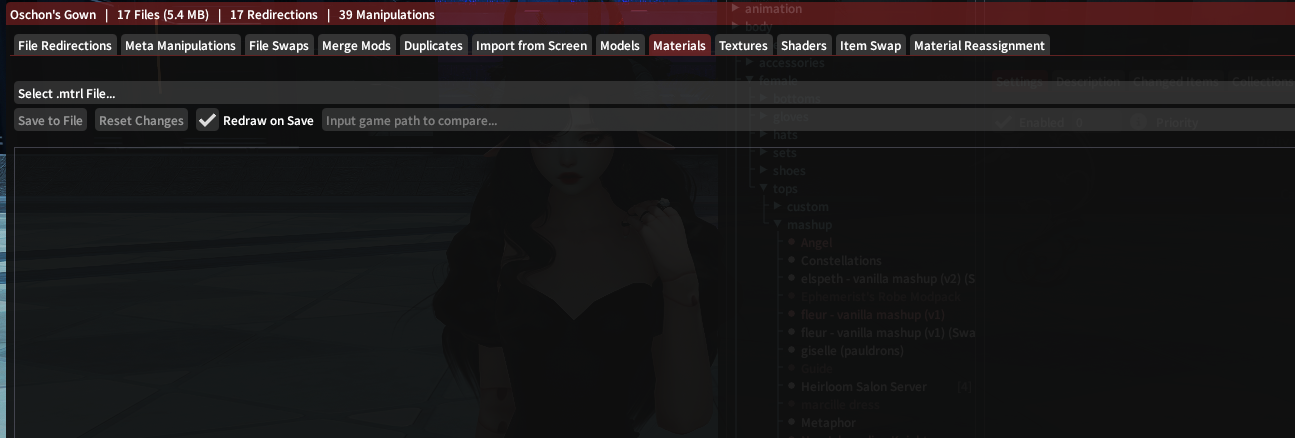
- <span style="font-size: 11pt; font-family: Arial,sans-serif; color: #000000; background-color: transparent; font-weight: 400; font-style: normal; font-variant: normal; text-decoration: none; vertical-align: baseline; white-space: pre-wrap;">Step 1 is navigating to the materials tab. To do this, go to your mod, and click advanced editing. The 8th tab should be named “Materials”. This is where we’ll be doing most of our work!</span><span style="font-size: 11pt; font-family: Arial,sans-serif; color: #000000; background-color: transparent; font-weight: 400; font-style: normal; font-variant: normal; text-decoration: none; vertical-align: baseline; white-space: pre-wrap;">  
    </span><span style="font-size: 11pt; font-family: Arial,sans-serif; color: #000000; background-color: transparent; font-weight: 400; font-style: normal; font-variant: normal; text-decoration: none; vertical-align: baseline; white-space: pre-wrap;"><span style="border: none; display: inline-block; overflow: hidden; width: 624px; height: 37px;">![](https://lh7-rt.googleusercontent.com/docsz/AD_4nXcQqP1uMa7O5I5RoVgUT_lUO6f6irhPLOWM-_8o4dPNG5yReW5s7u35Tb6-6U1XF4nkbudOg1NPqbmd3ZwWUWVpSr5fz3w28vQQ_U-8bN7D9OwwO7Lbm_Lq1MkAEp44b2paQAZxBCxZMdIW1l-i?key=-yowPvpdJ5vtGqEUkSfukw)</span></span>
- <span style="font-size: 11pt; font-family: Arial,sans-serif; color: #000000; background-color: transparent; font-weight: 400; font-style: normal; font-variant: normal; text-decoration: none; vertical-align: baseline; white-space: pre-wrap;">You’ll be greeted with this drop down box. </span><span style="font-size: 11pt; font-family: Arial,sans-serif; color: #000000; background-color: transparent; font-weight: 400; font-style: normal; font-variant: normal; text-decoration: none; vertical-align: baseline; white-space: pre-wrap;"><span style="border: none; display: inline-block; overflow: hidden; width: 562px; height: 191px;">![](https://lh7-rt.googleusercontent.com/docsz/AD_4nXdO_pDbR-ZwfRfiXlVatzpyq7Jj-4JBdl5haa-YD6IB7hXuLcJXKPjIErMSNG2CCymheKhVuO1IED3vKzQgb4ZxoHgZD7lJVZ1_47wFaxDYBVg03vMFK_vPjU3nK3miMrljlpecNri_OuBmiy4I3A?key=-yowPvpdJ5vtGqEUkSfukw)</span></span>
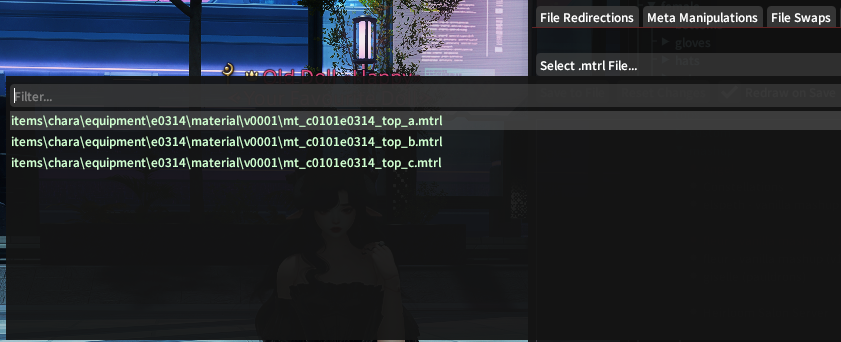
- <span style="font-size: 11pt; font-family: Arial,sans-serif; color: #000000; background-color: transparent; font-weight: 400; font-style: normal; font-variant: normal; text-decoration: none; vertical-align: baseline; white-space: pre-wrap;">Click on it. I recommend wearing the piece you’re trying to colorset, since you’ll be able to see which materials are visible.  
    </span><span style="font-size: 11pt; font-family: Arial,sans-serif; color: #000000; background-color: transparent; font-weight: 400; font-style: normal; font-variant: normal; text-decoration: none; vertical-align: baseline; white-space: pre-wrap;"><span style="border: none; display: inline-block; overflow: hidden; width: 574px; height: 234px;">![](https://lh7-rt.googleusercontent.com/docsz/AD_4nXevsMVX3ivnyBeKdrhJ2DaWA9xlW0aVGGanjofeMUroJp6NTKnjNDvF_u6esKGVqEA4VShB48aFUo5a91qB2dJFr8LdAOhcLuqEi9VbRmAQx7ov441wNm272W8XhydeTeLPHzjUThp_2xZQqtNW?key=-yowPvpdJ5vtGqEUkSfukw)</span></span>
- <span style="font-size: 11pt; font-family: Arial,sans-serif; color: #000000; background-color: transparent; font-weight: 400; font-style: normal; font-variant: normal; text-decoration: none; vertical-align: baseline; white-space: pre-wrap;">Any row that is green is a row that’s currently visible on your character. Click on top\_a.mtrl. </span><span style="font-size: 11pt; font-family: Arial,sans-serif; color: #000000; background-color: transparent; font-weight: 400; font-style: normal; font-variant: normal; text-decoration: none; vertical-align: baseline; white-space: pre-wrap;"><span style="border: none; display: inline-block; overflow: hidden; width: 562px; height: 562px;">![](https://lh7-rt.googleusercontent.com/docsz/AD_4nXcOPj03nuSRZidr4SjEaLwYLVvO36LoOPUginES6E2Q2gML5-pXVbkm3HKzeFkYYpB0PSgcIUyxHjwUD0X3mzZmLdPe6m_YfBG_ilG9I9AZaRGoHrjc3hHpkHOIHeYWZpS6u4VXuKHmsOq7KLp-?key=-yowPvpdJ5vtGqEUkSfukw)</span></span>
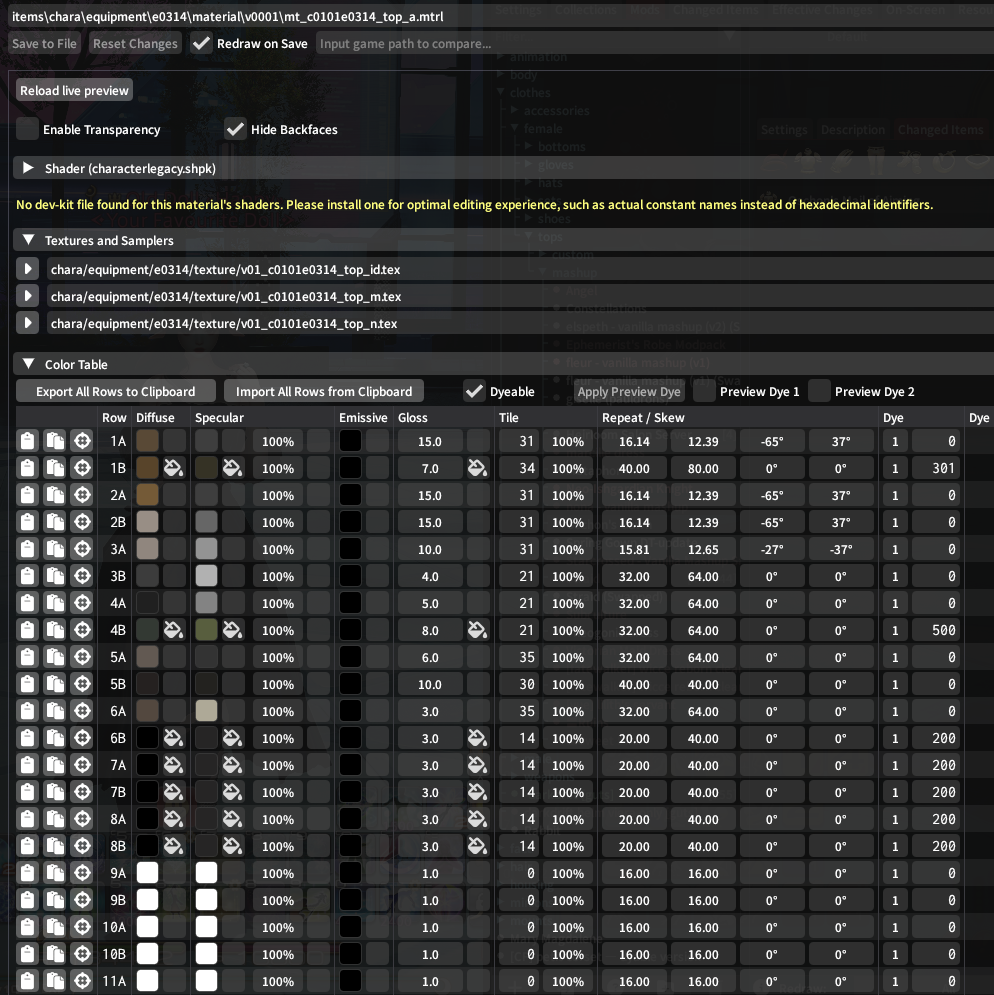
- <span style="font-size: 11pt; font-family: Arial,sans-serif; color: #000000; background-color: transparent; font-weight: 400; font-style: normal; font-variant: normal; text-decoration: none; vertical-align: baseline; white-space: pre-wrap;">You’ll see these rows. From here, wiggle around the values until you find something you like! </span>
- <span style="font-size: 11pt; font-family: Arial,sans-serif; color: #000000; background-color: transparent; font-weight: 400; font-style: normal; font-variant: normal; text-decoration: none; vertical-align: baseline; white-space: pre-wrap;">Once you have values you like, we’ll move onto making it dyeable! </span>
    - <span style="font-size: 11pt; font-family: Arial,sans-serif; color: #000000; background-color: transparent; font-weight: 400; font-style: normal; font-variant: normal; text-decoration: none; vertical-align: baseline; white-space: pre-wrap;">Next to each of the color values, there’s the box with the paint can you can tick! To make your rows dyeable, make sure both the diffuse checkbox and the specular checkbox are ticked! </span>
- <span style="font-size: 11pt; font-family: Arial,sans-serif; color: #000000; background-color: transparent; font-weight: 400; font-style: normal; font-variant: normal; text-decoration: none; vertical-align: baseline; white-space: pre-wrap;">If you made your row glow with Emissives, make sure the box next to that is ticked too!</span>
- <span style="font-size: 11pt; font-family: Arial,sans-serif; color: #000000; background-color: transparent; font-weight: 400; font-style: normal; font-variant: normal; text-decoration: none; vertical-align: baseline; white-space: pre-wrap;">Now, on the left side, we’ll add dye templates! </span>
    - <span style="font-size: 11pt; font-family: Arial,sans-serif; color: #000000; background-color: transparent; font-weight: 400; font-style: normal; font-variant: normal; text-decoration: none; vertical-align: baseline; white-space: pre-wrap;">These templates follow a pattern. </span>
        - <span style="font-size: 11pt; font-family: Arial,sans-serif; color: #000000; background-color: transparent; font-weight: 400; font-style: normal; font-variant: normal; text-decoration: none; vertical-align: baseline; white-space: pre-wrap;">Anything that ends in 0 will dye true to the color. </span>
        - <span style="font-size: 11pt; font-family: Arial,sans-serif; color: #000000; background-color: transparent; font-weight: 400; font-style: normal; font-variant: normal; text-decoration: none; vertical-align: baseline; white-space: pre-wrap;">Anything that ends in 1 will dye darker than the color</span>
        - <span style="font-size: 11pt; font-family: Arial,sans-serif; color: #000000; background-color: transparent; font-weight: 400; font-style: normal; font-variant: normal; text-decoration: none; vertical-align: baseline; white-space: pre-wrap;">Anything that ends in 2 will dye lighter than the color.</span><span style="font-size: 11pt; font-family: Arial,sans-serif; color: #000000; background-color: transparent; font-weight: 400; font-style: normal; font-variant: normal; text-decoration: none; vertical-align: baseline; white-space: pre-wrap;">  
              
            </span>

<span style="font-size: 11pt; font-family: Arial,sans-serif; color: #000000; background-color: transparent; font-weight: 400; font-style: normal; font-variant: normal; text-decoration: none; vertical-align: baseline; white-space: pre-wrap;"><span style="border: none; display: inline-block; overflow: hidden; width: 624px; height: 49px;">![](https://lh7-rt.googleusercontent.com/docsz/AD_4nXd2d0s8GoxO_1A4fpbKTRPDw3MQKyZRLUCCdphwIkhDVNBmx69IzgBWVuRX_KN7VsQ_q-tSQSsmWVFzwg9tLm8fTG0srZgdSuQE9otiCIP4BttO2I7MfP7mQNNAjq68QD2T7s0Bf88aAAYWJ3uvQw?key=-yowPvpdJ5vtGqEUkSfukw)</span></span>

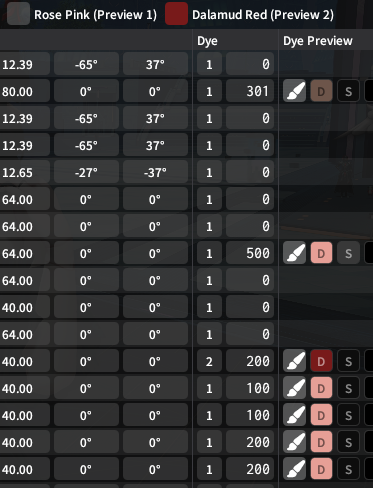
<span style="font-size: 11pt; font-family: Arial,sans-serif; color: #000000; background-color: transparent; font-weight: 400; font-style: normal; font-variant: normal; text-decoration: none; vertical-align: baseline; white-space: pre-wrap;">(Preview is with Rose Pink)</span>

<span style="font-size: 11pt; font-family: Arial,sans-serif; color: #000000; background-color: transparent; font-weight: 400; font-style: normal; font-variant: normal; text-decoration: none; vertical-align: baseline; white-space: pre-wrap;">Make sure to hit “Save to File” at the top left, and you’re all set! Now do this with your other materials!</span>

### <span style="font-size: 13.999999999999998pt; font-family: Arial,sans-serif; color: #434343; background-color: transparent; font-weight: 400; font-style: normal; font-variant: normal; text-decoration: none; vertical-align: baseline; white-space: pre-wrap;">Adding a 2nd dye channel</span>

<span style="font-size: 11pt; font-family: Arial,sans-serif; color: #000000; background-color: transparent; font-weight: 400; font-style: normal; font-variant: normal; text-decoration: none; vertical-align: baseline; white-space: pre-wrap;">Adding 2 dye channels is a relatively straight forward process. Next to the dye template, there’s the single values. Change this value to “2”. You’re all set!  
</span><span style="font-size: 11pt; font-family: Arial,sans-serif; color: #000000; background-color: transparent; font-weight: 400; font-style: normal; font-variant: normal; text-decoration: none; vertical-align: baseline; white-space: pre-wrap;"><span style="border: none; display: inline-block; overflow: hidden; width: 291px; height: 380px;">![](https://lh7-rt.googleusercontent.com/docsz/AD_4nXfkvQJl1_bn4kIT-UCtqla4jx_YzLUchscU60pJl_Rod2bTiNS_ZhxszQL5KPqwD3dSmq-mo5tgVRnOADWoan56PJmsnAyzNW793ScIjZdjuQlBff5VsCkDpelU_GqbRuT3qzFnldvWbQ7AfpV3gw?key=-yowPvpdJ5vtGqEUkSfukw)</span></span>

# <span style="font-size: 20pt; font-family: Arial,sans-serif; color: #000000; background-color: transparent; font-weight: 400; font-style: normal; font-variant: normal; text-decoration: none; vertical-align: baseline; white-space: pre-wrap;">Migrating from Character Legacy shaders to Character Shaders</span>

- <span style="font-size: 11pt; font-family: Arial,sans-serif; color: #000000; background-color: transparent; font-weight: 400; font-style: normal; font-variant: normal; text-decoration: none; vertical-align: baseline; white-space: pre-wrap;">This is easier to do in Penumbra than TexTools, so I’ll show the process there. </span>
- <span style="font-size: 11pt; font-family: Arial,sans-serif; color: #000000; background-color: transparent; font-weight: 400; font-style: normal; font-variant: normal; text-decoration: none; vertical-align: baseline; white-space: pre-wrap;">Find the material you want to have a Character shader using the process above. </span>
- <span style="font-size: 11pt; font-family: Arial,sans-serif; color: #000000; background-color: transparent; font-weight: 400; font-style: normal; font-variant: normal; text-decoration: none; vertical-align: baseline; white-space: pre-wrap;">The first drop-down box will say “Shader (characterlegacy.shpk)”. Open this! </span><span style="font-size: 11pt; font-family: Arial,sans-serif; color: #000000; background-color: transparent; font-weight: 400; font-style: normal; font-variant: normal; text-decoration: none; vertical-align: baseline; white-space: pre-wrap;"><span style="border: none; display: inline-block; overflow: hidden; width: 571px; height: 230px;">![](https://lh7-rt.googleusercontent.com/docsz/AD_4nXfVtpVn7tjsm6-PKLbRV003KKrZZ5v4hDM5Wn0Go-h_Uapat4E7V0fdWlvHcFXD9GHWlXMDGWj3RMT-oVBAt0x-O-OvJ98EHG5d074P3910fs-ted2c2ap9gDmDR6IfI0ztQQnoVqbW0-5buIb2fQ?key=-yowPvpdJ5vtGqEUkSfukw)</span></span><span style="font-size: 11pt; font-family: Arial,sans-serif; color: #000000; background-color: transparent; font-weight: 400; font-style: normal; font-variant: normal; text-decoration: none; vertical-align: baseline; white-space: pre-wrap;"> </span>
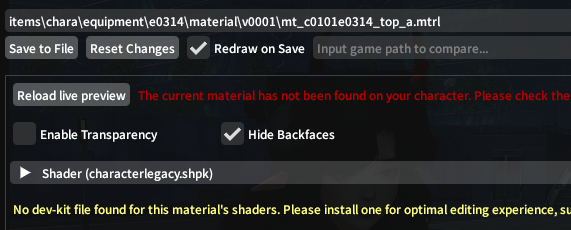
- <span style="font-size: 11pt; font-family: Arial,sans-serif; color: #000000; background-color: transparent; font-weight: 400; font-style: normal; font-variant: normal; text-decoration: none; vertical-align: baseline; white-space: pre-wrap;">You’ll see this set of drop-down boxes. We’re only changing the Shader Package! </span><span style="font-size: 11pt; font-family: Arial,sans-serif; color: #000000; background-color: transparent; font-weight: 400; font-style: normal; font-variant: normal; text-decoration: none; vertical-align: baseline; white-space: pre-wrap;"><span style="border: none; display: inline-block; overflow: hidden; width: 624px; height: 204px;">![](https://lh7-rt.googleusercontent.com/docsz/AD_4nXe8rxAi4Dy0ZOB0wWW-lYT5FFsgI1gX941EkOlMoHjoiXCU888W666pTjIT9CDP_0mFG1TR9o5s0DuSwG8meBGwCQgBnd-ODTwa60SbkGFo86khsVBZhzAXBcwehEaFdXp2RjiDsKhn_KxpjFw_UQ?key=-yowPvpdJ5vtGqEUkSfukw)</span></span>
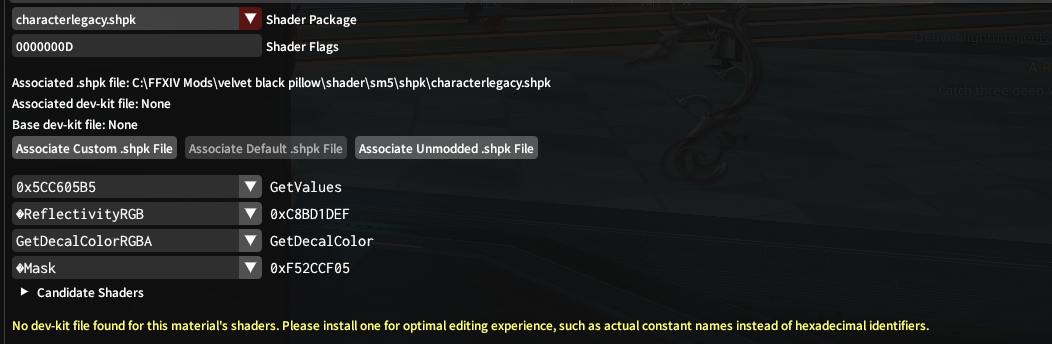
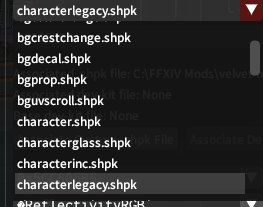
- <span style="font-size: 11pt; font-family: Arial,sans-serif; color: #000000; background-color: transparent; font-weight: 400; font-style: normal; font-variant: normal; text-decoration: none; vertical-align: baseline; white-space: pre-wrap;">Open the drop-down box, and scroll down. Click “character.shpk”, and save to file. You’re done with this step! </span><span style="font-size: 11pt; font-family: Arial,sans-serif; color: #000000; background-color: transparent; font-weight: 400; font-style: normal; font-variant: normal; text-decoration: none; vertical-align: baseline; white-space: pre-wrap;"><span style="border: none; display: inline-block; overflow: hidden; width: 263px; height: 207px;">![](https://lh7-rt.googleusercontent.com/docsz/AD_4nXcztya2rLiyQQtoVq41-I7G9xqaRJ2eg642l0mdKY-1ZUlg46mB-r1zTqq_RPWSdmdXjLz5zyotKN0qPI9iekPF3QzNo7CCb-hQXPaKkJCgZ1Dz3X2x8zSkevrNA2UijotZOuYSnw28ayiwTJZfeg?key=-yowPvpdJ5vtGqEUkSfukw)</span></span>
- <span style="font-size: 11pt; font-family: Arial,sans-serif; color: #000000; background-color: transparent; font-weight: 400; font-style: normal; font-variant: normal; text-decoration: none; vertical-align: baseline; white-space: pre-wrap;">Your colorset rows will change to look like this: </span><span style="font-size: 11pt; font-family: Arial,sans-serif; color: #000000; background-color: transparent; font-weight: 400; font-style: normal; font-variant: normal; text-decoration: none; vertical-align: baseline; white-space: pre-wrap;"><span style="border: none; display: inline-block; overflow: hidden; width: 562px; height: 326px;">![](https://lh7-rt.googleusercontent.com/docsz/AD_4nXe657lf1Dccmz1FDttcnEfrWym2N73T0BqBKtWPawxPwk_DOg_rr0cEv6bovJH7WcardRfLdBpanEfMEwCk21PIgFCu3e3AxD3lu7iDo9nD1OMbi1nKA1P0VmIlwBZW8ZcNCOPfgZhF0i1GnoFs6w?key=-yowPvpdJ5vtGqEUkSfukw)</span></span>
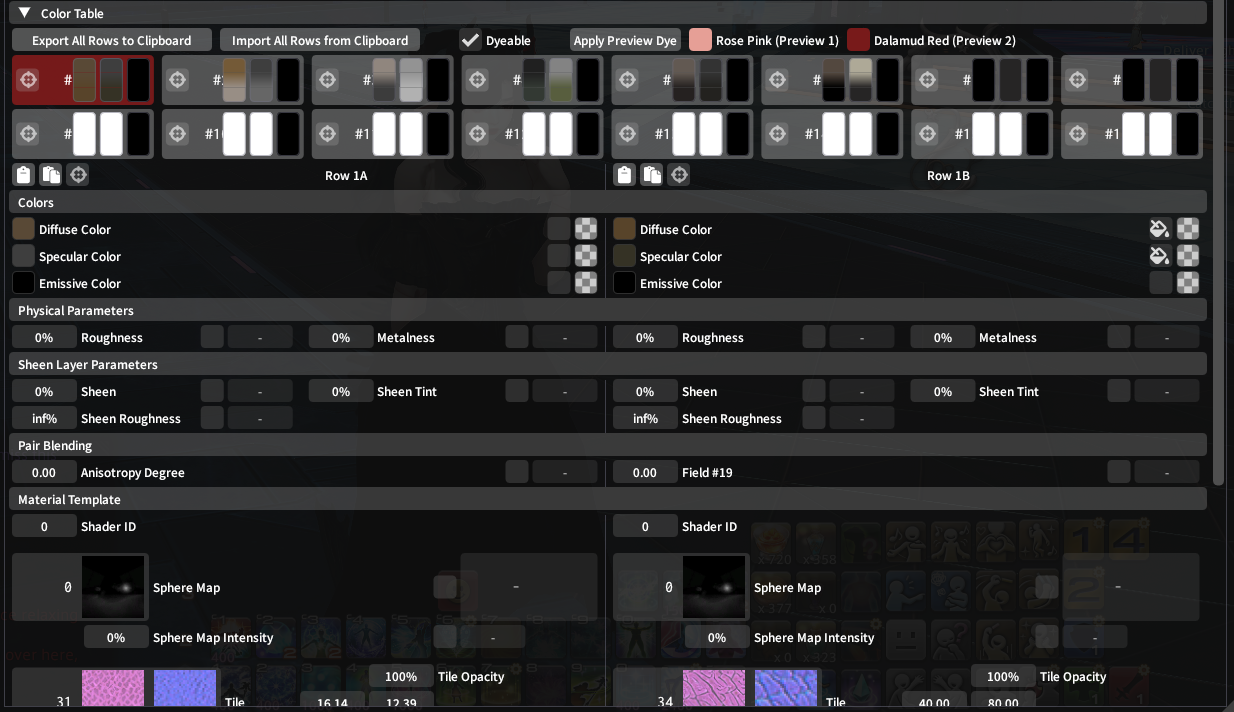
- <span style="font-size: 11pt; font-family: Arial,sans-serif; color: #000000; background-color: transparent; font-weight: 400; font-style: normal; font-variant: normal; text-decoration: none; vertical-align: baseline; white-space: pre-wrap;">This is the same as before, but horizontal, and a few more options. The 3 boxes stay the same and are split between 1A and 1B (for example). </span>
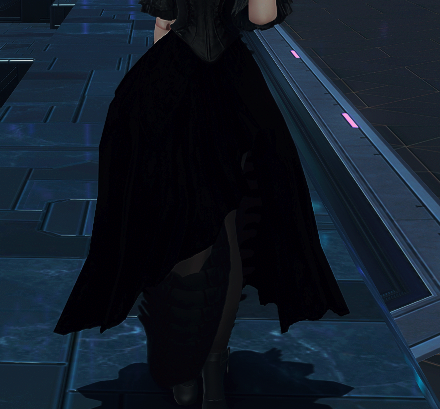
- <span style="font-size: 11pt; font-family: Arial,sans-serif; color: #000000; background-color: transparent; font-weight: 400; font-style: normal; font-variant: normal; text-decoration: none; vertical-align: baseline; white-space: pre-wrap;">You’ll notice that the mesh tied to this material is now pitch black, and not dying. Let’s fix that!</span><span style="font-size: 11pt; font-family: Arial,sans-serif; color: #000000; background-color: transparent; font-weight: 400; font-style: normal; font-variant: normal; text-decoration: none; vertical-align: baseline; white-space: pre-wrap;">  
    </span><span style="font-size: 11pt; font-family: Arial,sans-serif; color: #000000; background-color: transparent; font-weight: 400; font-style: normal; font-variant: normal; text-decoration: none; vertical-align: baseline; white-space: pre-wrap;"><span style="border: none; display: inline-block; overflow: hidden; width: 396px; height: 368px;">![](https://lh7-rt.googleusercontent.com/docsz/AD_4nXdg_A3s3bzlo3_5zNuvwB1CmPlMxY7jIpavA35dNezTn_WDW7JOLn6lSa2hTYY_5EHfvIRvBwE7iOYODtHeH6uIgKRi1rLN89BlOFzxQHhM0dir7jr-xZUPuZIvyvJQa-O0FJVmef9XbwDHvNtmeg?key=-yowPvpdJ5vtGqEUkSfukw)</span></span>
- <span style="font-size: 11pt; font-family: Arial,sans-serif; color: #000000; background-color: transparent; font-weight: 400; font-style: normal; font-variant: normal; text-decoration: none; vertical-align: baseline; white-space: pre-wrap;">Find the colorset row that affects the visible bits of the mesh. </span><span style="font-size: 11pt; font-family: Arial,sans-serif; color: #000000; background-color: transparent; font-weight: 400; font-style: normal; font-variant: normal; text-decoration: none; vertical-align: baseline; white-space: pre-wrap;"><span style="border: none; display: inline-block; overflow: hidden; width: 434px; height: 495px;">![](https://lh7-rt.googleusercontent.com/docsz/AD_4nXeceqe9NjoccsM0zaEskEpBu31DlTaqe3W2U7krrQl1WVXx87vjiDz_XHlDyQke11tD7Gttb7wjCvqkMjGikIZLDaooHVfjfTQmjl7DWTvZyiAOfUL8ZfLaz27ifFjXJKXXaIgDME3GuwZjrTYxvA?key=-yowPvpdJ5vtGqEUkSfukw)</span></span>
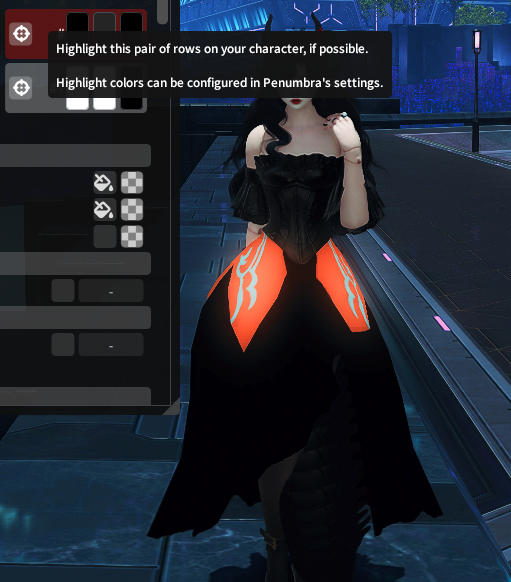
- <span style="font-size: 11pt; font-family: Arial,sans-serif; color: #000000; background-color: transparent; font-weight: 400; font-style: normal; font-variant: normal; text-decoration: none; vertical-align: baseline; white-space: pre-wrap;">For me, this is 8B. Any pre-DT items will be on rows 1-8. Rows 9-16 are only utilized by the new pieces of gear. </span>
- <span style="font-size: 11pt; font-family: Arial,sans-serif; color: #000000; background-color: transparent; font-weight: 400; font-style: normal; font-variant: normal; text-decoration: none; vertical-align: baseline; white-space: pre-wrap;">Click on this row, and scroll down until you see these boxes. </span><span style="font-size: 11pt; font-family: Arial,sans-serif; color: #000000; background-color: transparent; font-weight: 400; font-style: normal; font-variant: normal; text-decoration: none; vertical-align: baseline; white-space: pre-wrap;"><span style="border: none; display: inline-block; overflow: hidden; width: 562px; height: 249px;">![](https://lh7-rt.googleusercontent.com/docsz/AD_4nXfx0rKPdNjK2qb74X8JHoyJ8nvdsdmux_P5C8kyq9wd7WFA11WDOst6weSo2O2LkWscpi4_kBsaIAyOkT8GlkOdCxx4wTFhoQQEAJ_ADu6jt8HDFYvLbv5hS_tzNuLj_sA5PL8F02ZpBpqeC_vc?key=-yowPvpdJ5vtGqEUkSfukw)</span></span>
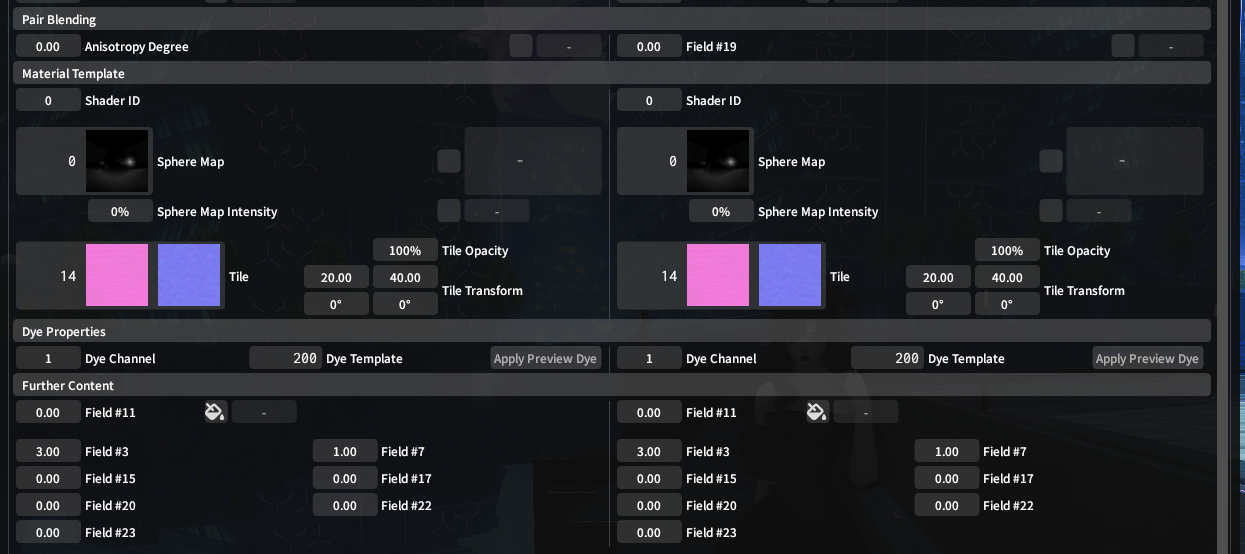
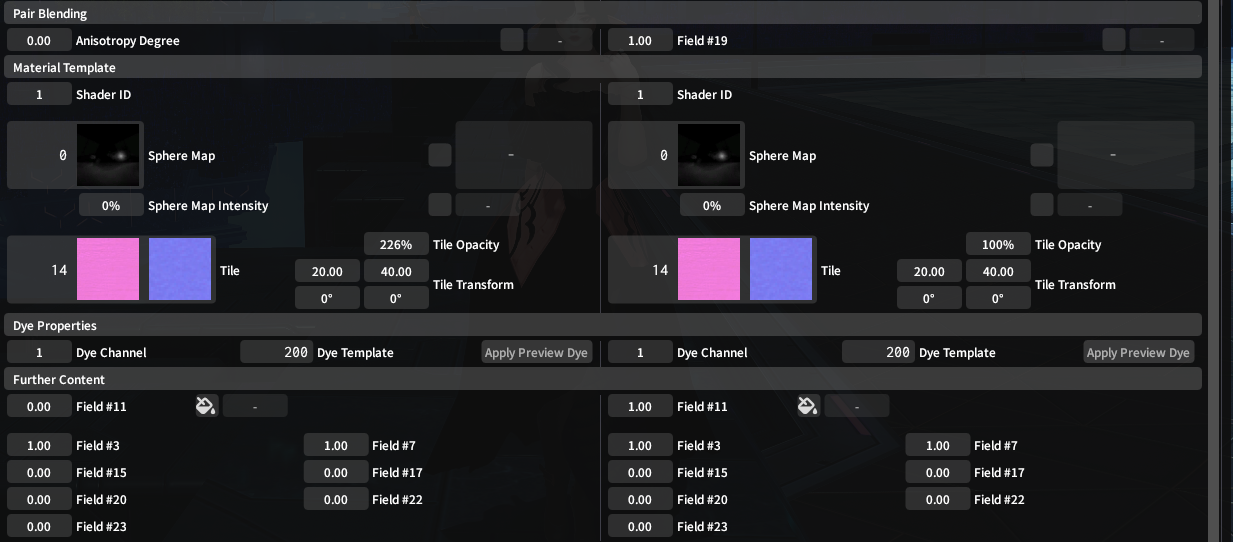
- <span style="font-size: 11pt; font-family: Arial,sans-serif; color: #000000; background-color: transparent; font-weight: 400; font-style: normal; font-variant: normal; text-decoration: none; vertical-align: baseline; white-space: pre-wrap;">You’re going to be entering the value “1” in Field #19, Shader ID, and “Field 11”. </span>
- <span style="font-size: 11pt; font-family: Arial,sans-serif; color: #000000; background-color: transparent; font-weight: 400; font-style: normal; font-variant: normal; text-decoration: none; vertical-align: baseline; white-space: pre-wrap;">When done, the boxes should look like this!</span><span style="font-size: 11pt; font-family: Arial,sans-serif; color: #000000; background-color: transparent; font-weight: 400; font-style: normal; font-variant: normal; text-decoration: none; vertical-align: baseline; white-space: pre-wrap;">  
    </span><span style="font-size: 11pt; font-family: Arial,sans-serif; color: #000000; background-color: transparent; font-weight: 400; font-style: normal; font-variant: normal; text-decoration: none; vertical-align: baseline; white-space: pre-wrap;"><span style="border: none; display: inline-block; overflow: hidden; width: 562px; height: 246px;">![](https://lh7-rt.googleusercontent.com/docsz/AD_4nXe3znAf7Qo_ziEzWufa62oc9Jb-MCb6bNdDsD1i_iKsjB_wPPdusDS8iGGG1LXkJb7nkJAogGpDMak3kO1NIA8ktcwmPYwyNnaQFmEtp_XHt_zBVoTEYsdLmKp9kZostw5DnGO4LG-vnfVIQMG8Nw?key=-yowPvpdJ5vtGqEUkSfukw)</span></span>
- <span style="font-size: 11pt; font-family: Arial,sans-serif; color: #000000; background-color: transparent; font-weight: 400; font-style: normal; font-variant: normal; text-decoration: none; vertical-align: baseline; white-space: pre-wrap;">Now, we need to change the dye template to the DT dyes. </span><span style="font-size: 11pt; font-family: Arial,sans-serif; color: #000000; background-color: transparent; font-weight: 400; font-style: normal; font-variant: normal; text-decoration: none; vertical-align: baseline; white-space: pre-wrap;"><span style="border: none; display: inline-block; overflow: hidden; width: 562px; height: 233px;">![](https://lh7-rt.googleusercontent.com/docsz/AD_4nXfcmWWbOGlHKy2TqRFkf0pYaA89uZ0eR54lcTJ_6c62Ri3eJcUNXTrRSvNJgW8ERmu6hzHVCSS5I_qhh9NvzHrZbOXJ-luFuOi5RKNTo3hHN6b4Q4DAADjXmWzZu-mf_MFjHVecRR1q7a6gng9bsg?key=-yowPvpdJ5vtGqEUkSfukw)</span></span>
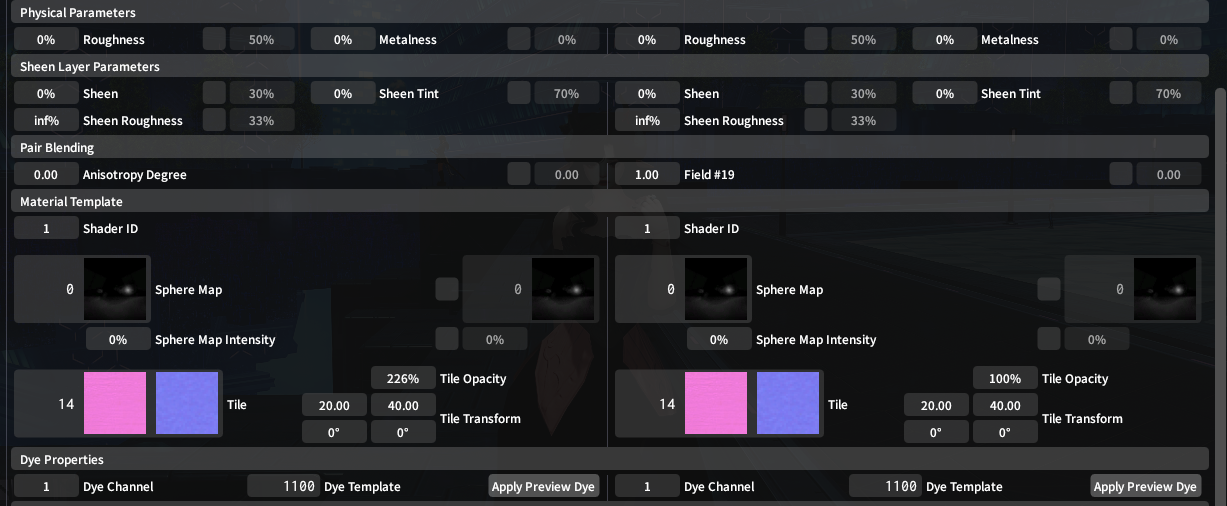
- <span style="font-size: 11pt; font-family: Arial,sans-serif; color: #000000; background-color: transparent; font-weight: 400; font-style: normal; font-variant: normal; text-decoration: none; vertical-align: baseline; white-space: pre-wrap;">The same rule of the dye # endings still applies here!</span>
- <span style="font-size: 11pt; font-family: Arial,sans-serif; color: #000000; background-color: transparent; font-weight: 400; font-style: normal; font-variant: normal; text-decoration: none; vertical-align: baseline; white-space: pre-wrap;">Once you’re done, click save!   
    </span><span style="font-size: 20pt; font-family: Arial,sans-serif; color: #000000; background-color: transparent; font-weight: 400; font-style: normal; font-variant: normal; text-decoration: none; vertical-align: baseline; white-space: pre-wrap;">Colors + Textures</span>
- <span style="font-size: 13.999999999999998pt; font-family: Arial,sans-serif; color: #434343; background-color: transparent; font-weight: 400; font-style: normal; font-variant: normal; text-decoration: none; vertical-align: baseline; white-space: pre-wrap;">Velvet</span>
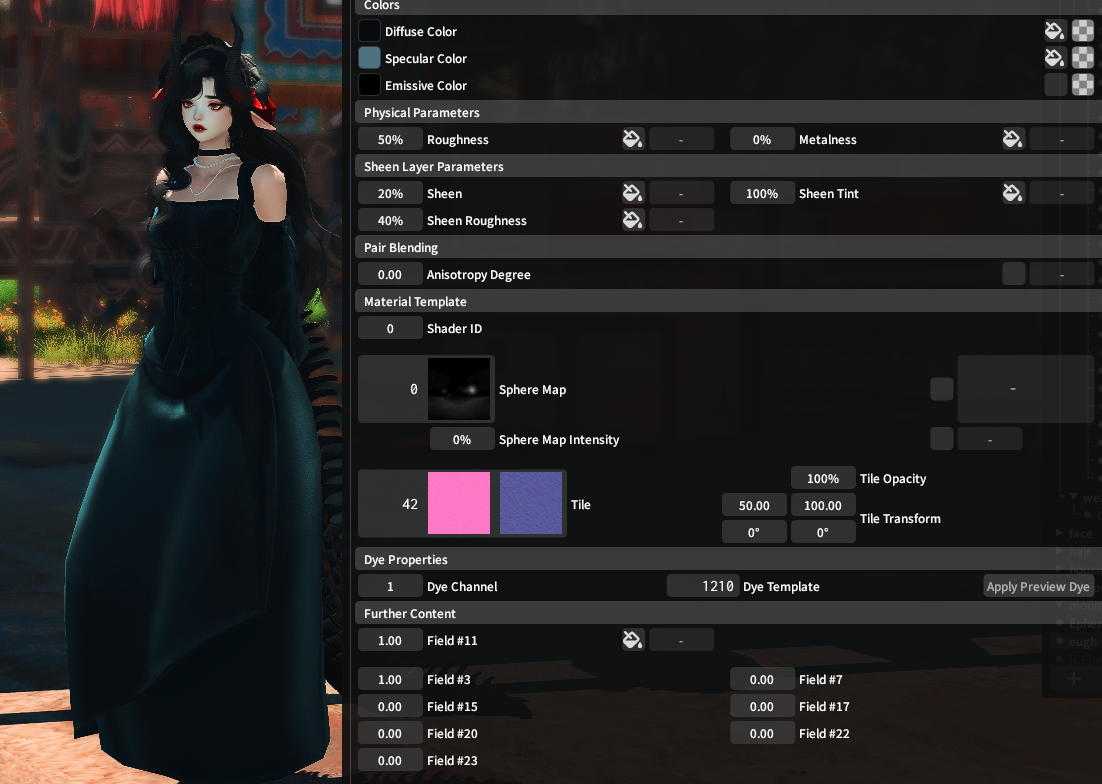
    - <span style="font-size: 11pt; font-family: Arial,sans-serif; color: #000000; background-color: transparent; font-weight: 400; font-style: normal; font-variant: normal; text-decoration: none; vertical-align: baseline; white-space: pre-wrap;">REQUIRES a character shader, not character legacy</span>
    - <span style="font-size: 11pt; font-family: Arial,sans-serif; color: #000000; background-color: transparent; font-weight: 400; font-style: normal; font-variant: normal; text-decoration: none; vertical-align: baseline; white-space: pre-wrap;">This is ripped from the Ephemerist’s coat, but it works just the same! You don’t need special textures. </span>
<span style="font-size: 11pt; font-family: Arial,sans-serif; color: #000000; background-color: transparent; font-weight: 400; font-style: normal; font-variant: normal; text-decoration: none; vertical-align: baseline; white-space: pre-wrap;"><span style="border: none; display: inline-block; overflow: hidden; width: 624px; height: 445px;">![](https://lh7-rt.googleusercontent.com/docsz/AD_4nXeAGD--9tV51MAvcimPl5Db7EdsaUhny4mUSfV0f8nVX0uPojBiCCCs8inmKzM5WBD1uU3uVkk5DeUTv1IgAhYbZO7V10U6wTUKW39wezi_bcHCoX6VUB8PQ0rfBNXMV8sS7dfX9DsJ_qNFGZizvQ?key=-yowPvpdJ5vtGqEUkSfukw)</span></span>

- <span style="font-size: 13.999999999999998pt; font-family: Arial,sans-serif; color: #434343; background-color: transparent; font-weight: 400; font-style: normal; font-variant: normal; text-decoration: none; vertical-align: baseline; white-space: pre-wrap;">Metal</span>
    - <span style="font-size: 11pt; font-family: Arial,sans-serif; color: #000000; background-color: transparent; font-weight: 400; font-style: normal; font-variant: normal; text-decoration: none; vertical-align: baseline; white-space: pre-wrap;">REQUIRES a character shader, not character legacy</span>
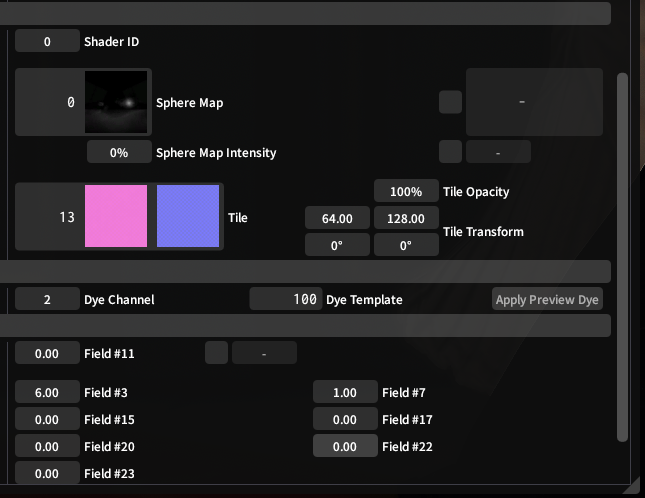
    - <span style="font-size: 11pt; font-family: Arial,sans-serif; color: #000000; background-color: transparent; font-weight: 400; font-style: normal; font-variant: normal; text-decoration: none; vertical-align: baseline; white-space: pre-wrap;">In your colorset row, scroll down to the bottom tabs. </span>
<span style="font-size: 11pt; font-family: Arial,sans-serif; color: #000000; background-color: transparent; font-weight: 400; font-style: normal; font-variant: normal; text-decoration: none; vertical-align: baseline; white-space: pre-wrap;"><span style="border: none; display: inline-block; overflow: hidden; width: 449px; height: 347px;">![](https://lh7-rt.googleusercontent.com/docsz/AD_4nXdAEFycPjGCyeyKY9vFpEncyxGm_7rF41ft8OUGbQUxc-ckndfb5KB7MWr8Fd4qX3KQKa2N3DWy9f5Uczni-ANPoyR50rfE-nLmLa9HC3fB9kChkIVEIEB6b_3XO4SeKJU1Iwx6qYTCwV0-wnTn?key=-yowPvpdJ5vtGqEUkSfukw)</span></span>

- <span style="font-size: 11pt; font-family: Arial,sans-serif; color: #000000; background-color: transparent; font-weight: 400; font-style: normal; font-variant: normal; text-decoration: none; vertical-align: baseline; white-space: pre-wrap;">You’re looking for “Sphere Map” and “Sphere Map Intensity”</span><span style="font-size: 11pt; font-family: Arial,sans-serif; color: #000000; background-color: transparent; font-weight: 400; font-style: normal; font-variant: normal; text-decoration: none; vertical-align: baseline; white-space: pre-wrap;">  
    </span><span style="font-size: 11pt; font-family: Arial,sans-serif; color: #000000; background-color: transparent; font-weight: 400; font-style: normal; font-variant: normal; text-decoration: none; vertical-align: baseline; white-space: pre-wrap;"><span style="border: none; display: inline-block; overflow: hidden; width: 136px; height: 457px;">![](https://lh7-rt.googleusercontent.com/docsz/AD_4nXdXpfMDio6nvzxMdFWLWr9UvdxyJ1xidsys3xjRBZLk_NHYKIKrIo48yD9Abm7pDLiXpIjgFUeCBuVHpPEhjq-QKnGQY_cYZEnJhG3nVZx_H1gwcXiOU8H5GLAtqiKLPl8aT8kp8VvFFB4u6sWIHg?key=-yowPvpdJ5vtGqEUkSfukw)</span></span>
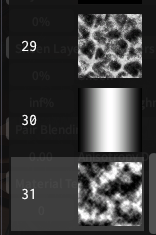
- <span style="font-size: 11pt; font-family: Arial,sans-serif; color: #000000; background-color: transparent; font-weight: 400; font-style: normal; font-variant: normal; text-decoration: none; vertical-align: baseline; white-space: pre-wrap;">There are a few ways to accomplish a metal look! Scroll all the way to the bottom, and you’ll find these. </span><span style="font-size: 11pt; font-family: Arial,sans-serif; color: #000000; background-color: transparent; font-weight: 400; font-style: normal; font-variant: normal; text-decoration: none; vertical-align: baseline; white-space: pre-wrap;">  
    </span><span style="font-size: 11pt; font-family: Arial,sans-serif; color: #000000; background-color: transparent; font-weight: 400; font-style: normal; font-variant: normal; text-decoration: none; vertical-align: baseline; white-space: pre-wrap;"><span style="border: none; display: inline-block; overflow: hidden; width: 156px; height: 235px;">![](https://lh7-rt.googleusercontent.com/docsz/AD_4nXe_BNH9XnBQDLrpcFgZKYDdTLEevFHMcMOpPnwpEMePiAMO1cheQaNYQCyAC2HaDPWoJrtuh2j6HIrW9abnBlP4mHda-l0wxcDW8q3gv-kEIGAUay7N6Uo-lu4-7btfjRm8p2gDcAUfCbEV-MaO?key=-yowPvpdJ5vtGqEUkSfukw)</span></span>
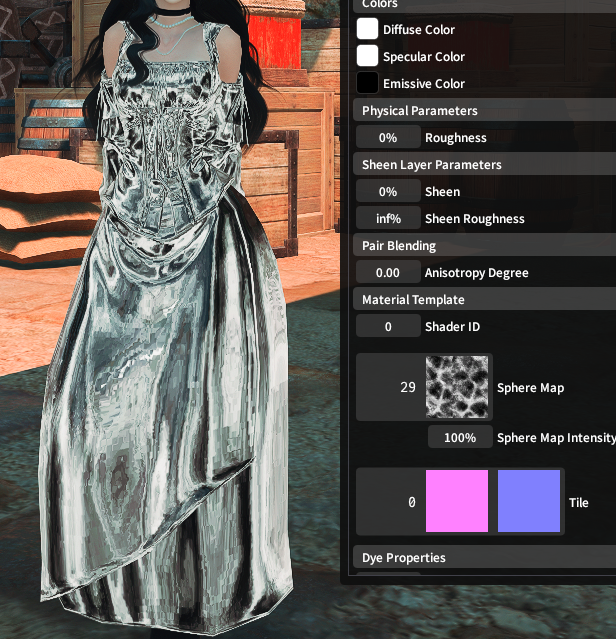
- <span style="font-size: 11pt; font-family: Arial,sans-serif; color: #000000; background-color: transparent; font-weight: 400; font-style: normal; font-variant: normal; text-decoration: none; vertical-align: baseline; white-space: pre-wrap;">Sphere Map 29  
    </span><span style="font-size: 11pt; font-family: Arial,sans-serif; color: #000000; background-color: transparent; font-weight: 400; font-style: normal; font-variant: normal; text-decoration: none; vertical-align: baseline; white-space: pre-wrap;"><span style="border: none; display: inline-block; overflow: hidden; width: 616px; height: 639px;">![](https://lh7-rt.googleusercontent.com/docsz/AD_4nXfFFFw07lZB_orUiHBfIfRSZvfBNxf2BEfx4KTDCnXz17WTWxR1W62Yao_aIEboYeNg8ZLg6v2tzbpOi09k61grgxlV9OPMNtJJxFrLleTNqvdihYRu-BHJO4IbGealw51sEXn5onWxUdfSt0RD0w?key=-yowPvpdJ5vtGqEUkSfukw)</span></span>
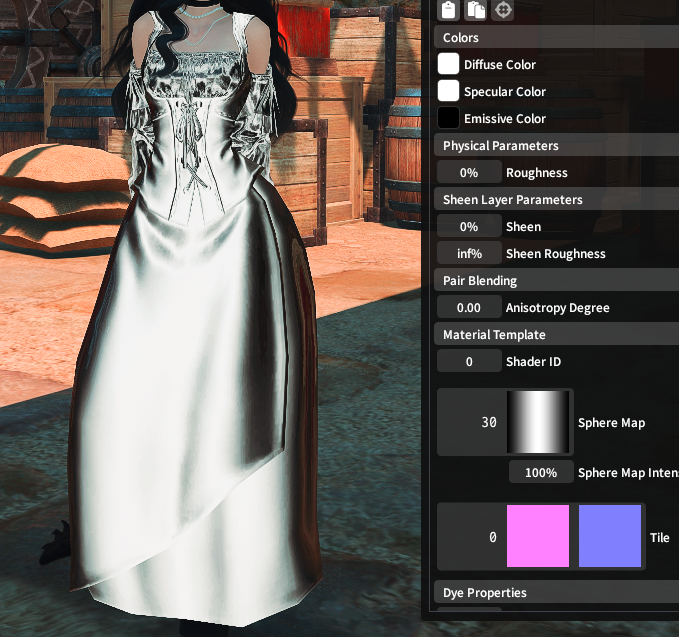
- <span style="font-size: 11pt; font-family: Arial,sans-serif; color: #000000; background-color: transparent; font-weight: 400; font-style: normal; font-variant: normal; text-decoration: none; vertical-align: baseline; white-space: pre-wrap;">Sphere Map 30  
    </span><span style="font-size: 11pt; font-family: Arial,sans-serif; color: #000000; background-color: transparent; font-weight: 400; font-style: normal; font-variant: normal; text-decoration: none; vertical-align: baseline; white-space: pre-wrap;"><span style="border: none; display: inline-block; overflow: hidden; width: 624px; height: 585px;">![](https://lh7-rt.googleusercontent.com/docsz/AD_4nXeLaWMNoln4hXNsHCPFYmeg5PDoF_u-3J8oFiBd0OrQeVybi-YY0E813a61vBsG72Ihx346-yv35SsxSrYAVLlUHPLXB_tz7dbZTIT-RcySFqXlYK8M3zDkH4ITPXeYY2miqUsIZC9j2-QIObeH1Q?key=-yowPvpdJ5vtGqEUkSfukw)</span></span>
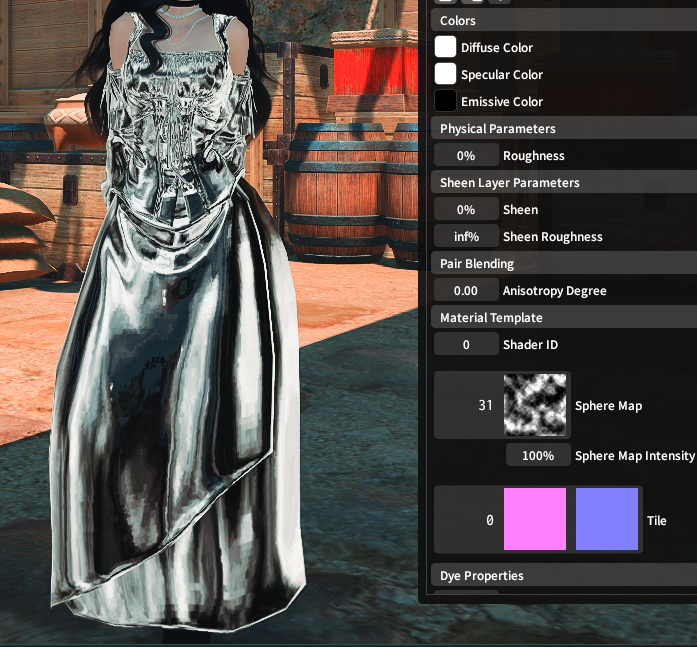
- <span style="font-size: 11pt; font-family: Arial,sans-serif; color: #000000; background-color: transparent; font-weight: 400; font-style: normal; font-variant: normal; text-decoration: none; vertical-align: baseline; white-space: pre-wrap;">Sphere Map 31  
    </span><span style="font-size: 11pt; font-family: Arial,sans-serif; color: #000000; background-color: transparent; font-weight: 400; font-style: normal; font-variant: normal; text-decoration: none; vertical-align: baseline; white-space: pre-wrap;"><span style="border: none; display: inline-block; overflow: hidden; width: 624px; height: 579px;">![](https://lh7-rt.googleusercontent.com/docsz/AD_4nXegh1b4oPBaGocBJP2x3bpTmzBhncq9089fkCXCV7n3AeO2OVEhSYe9tyRKs_YwqzRkLtRPTXSDih-A3CsqJeCaS7fXxkGk9rBmaNmH8rAietUw8tRiJ6-ehNWC8eYxR0KzrfNa2aEEbpKoNYHm?key=-yowPvpdJ5vtGqEUkSfukw)</span></span>
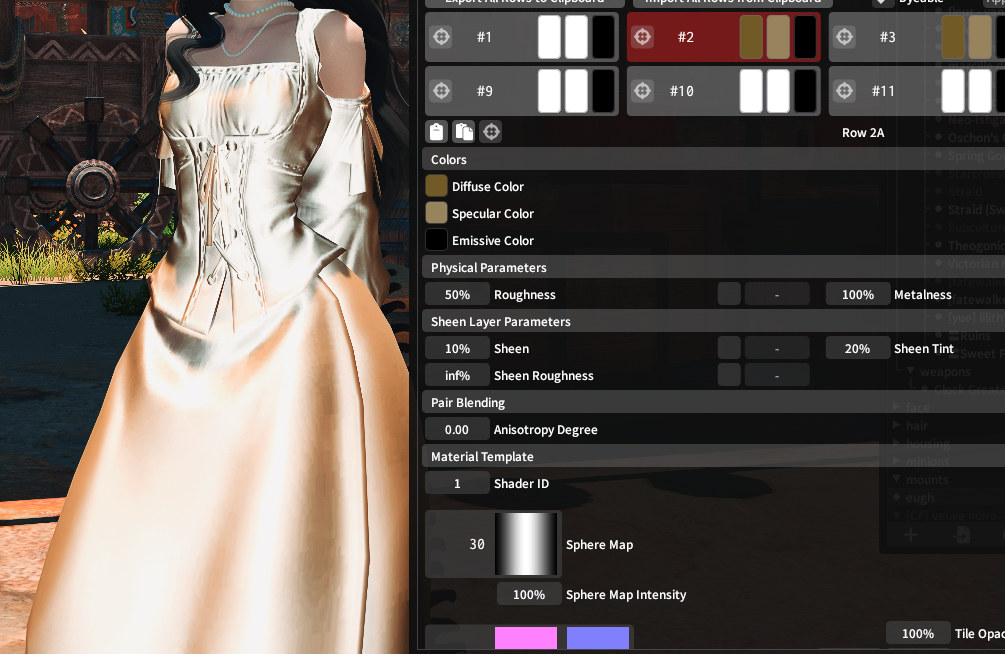
- <span style="font-size: 11pt; font-family: Arial,sans-serif; color: #000000; background-color: transparent; font-weight: 400; font-style: normal; font-variant: normal; text-decoration: none; vertical-align: baseline; white-space: pre-wrap;">From here, colorset until it looks nice! I’d recommend a darker diffuse, and a lighter specular! Here’s what mine looks like for a nice gold effect. </span><span style="font-size: 11pt; font-family: Arial,sans-serif; color: #000000; background-color: transparent; font-weight: 400; font-style: normal; font-variant: normal; text-decoration: none; vertical-align: baseline; white-space: pre-wrap;">  
    </span><span style="font-size: 11pt; font-family: Arial,sans-serif; color: #000000; background-color: transparent; font-weight: 400; font-style: normal; font-variant: normal; text-decoration: none; vertical-align: baseline; white-space: pre-wrap;"><span style="border: none; display: inline-block; overflow: hidden; width: 624px; height: 407px;">![](https://lh7-rt.googleusercontent.com/docsz/AD_4nXfXYpJVrstJ_SKtMejdMGSQV1ndEXeJqm5AustIVef-ISnsJuVQTcUOvzaulUjzZAacOEWS4tlUDT60D1CDniD_5cn0u-TbCnidoyfnnDeoIadBdVE7pMtzORKDzEJlLlDL2MCOxEi5LrIJj0MScQ?key=-yowPvpdJ5vtGqEUkSfukw)</span></span>
- <span style="font-size: 13.999999999999998pt; font-family: Arial,sans-serif; color: #434343; background-color: transparent; font-weight: 400; font-style: normal; font-variant: normal; text-decoration: none; vertical-align: baseline; white-space: pre-wrap;">Glass</span>
    - <span style="font-size: 11pt; font-family: Arial,sans-serif; color: #000000; background-color: transparent; font-weight: 400; font-style: normal; font-variant: normal; text-decoration: none; vertical-align: baseline; white-space: pre-wrap;">This is a mix of textures and colorsets.</span>
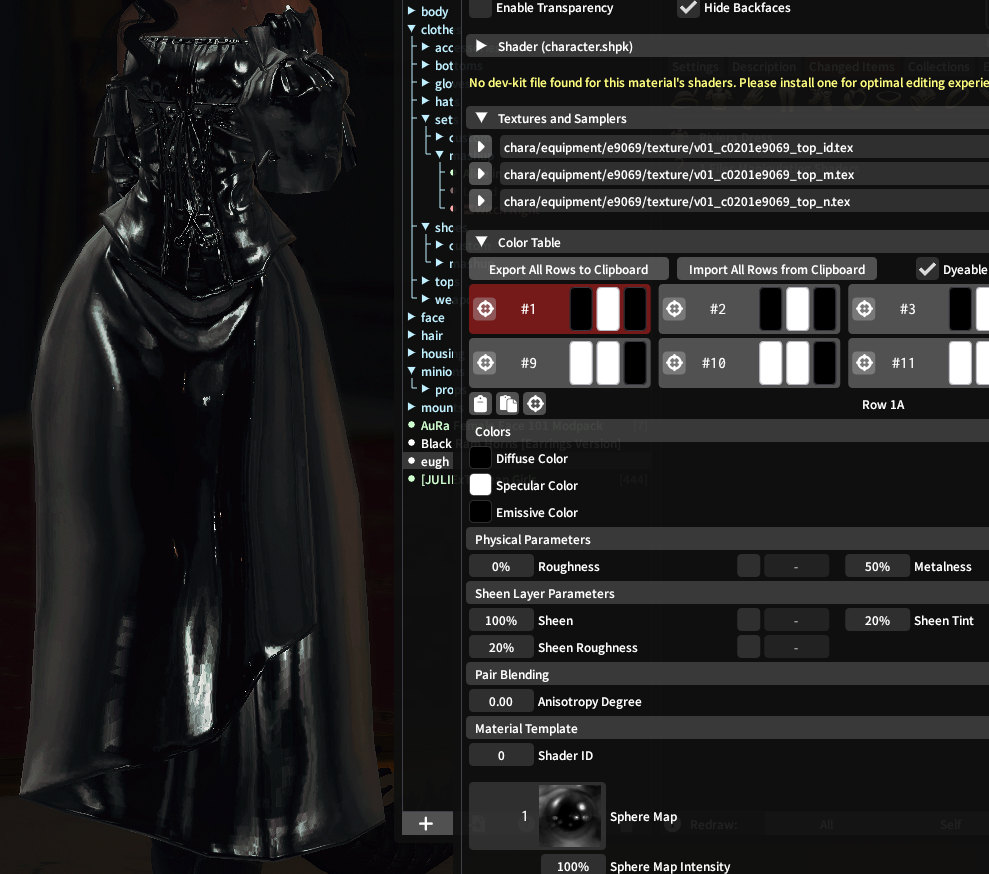
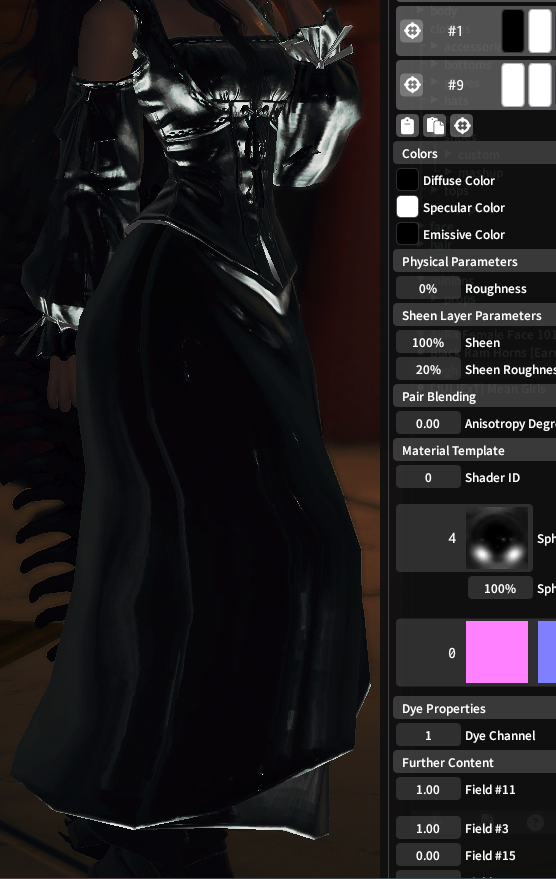
    - <span style="font-size: 11pt; font-family: Arial,sans-serif; color: #000000; background-color: transparent; font-weight: 400; font-style: normal; font-variant: normal; text-decoration: none; vertical-align: baseline; white-space: pre-wrap;">For colorsets, you want the material to be as shiny as you can get it. Black diffuse, white specular.</span><span style="font-size: 11pt; font-family: Arial,sans-serif; color: #000000; background-color: transparent; font-weight: 400; font-style: normal; font-variant: normal; text-decoration: none; vertical-align: baseline; white-space: pre-wrap;">  
        </span><span style="font-size: 11pt; font-family: Arial,sans-serif; color: #000000; background-color: transparent; font-weight: 400; font-style: normal; font-variant: normal; text-decoration: none; vertical-align: baseline; white-space: pre-wrap;"> </span><span style="font-size: 11pt; font-family: Arial,sans-serif; color: #000000; background-color: transparent; font-weight: 400; font-style: normal; font-variant: normal; text-decoration: none; vertical-align: baseline; white-space: pre-wrap;"><span style="border: none; display: inline-block; overflow: hidden; width: 574px; height: 508px;">![](https://lh7-rt.googleusercontent.com/docsz/AD_4nXdRuPnO5g_8Bwc9mbikHzjMNxssQyJn6_FTDSO2by9BGBVchO_haYHJbPxSjQF5Vf-yWmJSm4ITOSHN4kDmM0zAEd9FI1ypwEFFUINMlkM7JJdyzsHncTmg6hwBUdzVI1-CySZKt7fVnMKm0LsT1g?key=-yowPvpdJ5vtGqEUkSfukw)</span></span>
- <span style="font-size: 11pt; font-family: Arial,sans-serif; color: #000000; background-color: transparent; font-weight: 400; font-style: normal; font-variant: normal; text-decoration: none; vertical-align: baseline; white-space: pre-wrap;">I found Sphere Map 1 to be the best for this, but Sphere Map 4 also works well!</span><span style="font-size: 11pt; font-family: Arial,sans-serif; color: #000000; background-color: transparent; font-weight: 400; font-style: normal; font-variant: normal; text-decoration: none; vertical-align: baseline; white-space: pre-wrap;">  
    </span><span style="font-size: 11pt; font-family: Arial,sans-serif; color: #000000; background-color: transparent; font-weight: 400; font-style: normal; font-variant: normal; text-decoration: none; vertical-align: baseline; white-space: pre-wrap;"><span style="border: none; display: inline-block; overflow: hidden; width: 450px; height: 711px;">![](https://lh7-rt.googleusercontent.com/docsz/AD_4nXe0UVCtblLHaqxaqh04HxBsqO7mcFk7PYBm5SLdT1pUVOCh1Zm-KvtPszVonx0plgfArk0TXMt9ye3_hrINI6i8P50k_PJmJuomIAYAhUOHkdZefol88vEcRO-AY-YScjePQK4NyUatM5f7q6biuA?key=-yowPvpdJ5vtGqEUkSfukw)</span></span><span style="font-size: 11pt; font-family: Arial,sans-serif; color: #000000; background-color: transparent; font-weight: 400; font-style: normal; font-variant: normal; text-decoration: none; vertical-align: baseline; white-space: pre-wrap;"> </span>
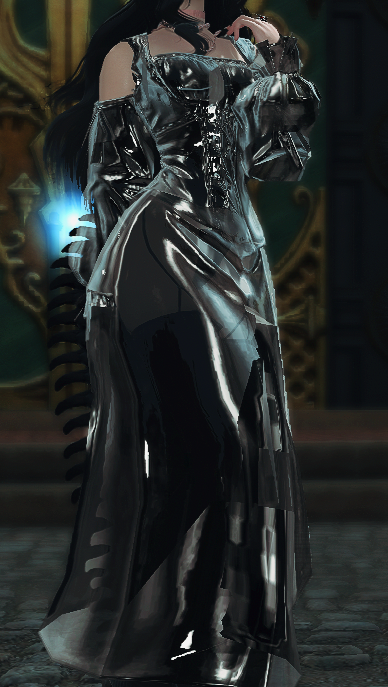
- <span style="font-size: 11pt; font-family: Arial,sans-serif; color: #000000; background-color: transparent; font-weight: 400; font-style: normal; font-variant: normal; text-decoration: none; vertical-align: baseline; white-space: pre-wrap;">You can leave it here if you’d like, but adding some extra shininess via the normals is also nice!</span>
    
    
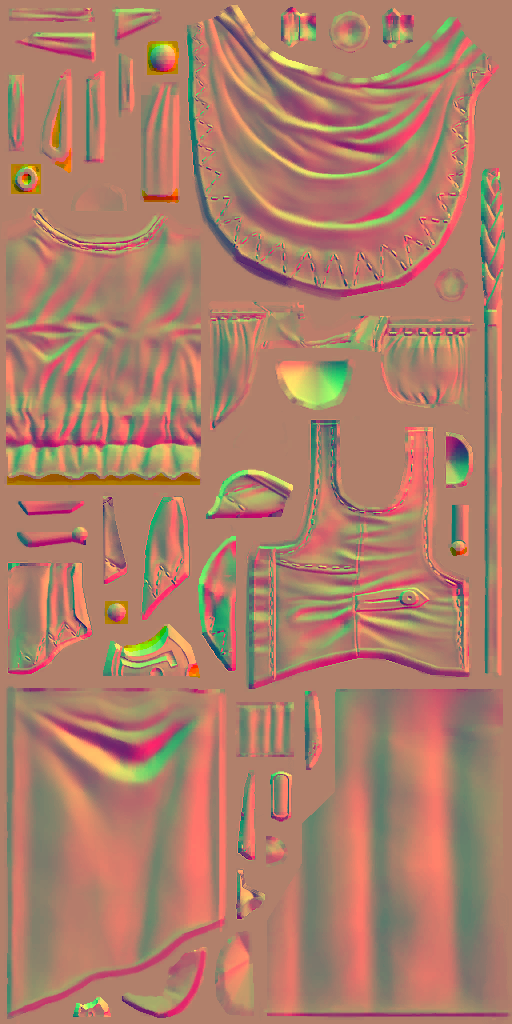
    - <span style="font-size: 11pt; font-family: Arial,sans-serif; color: #000000; background-color: transparent; font-weight: 400; font-style: normal; font-variant: normal; text-decoration: none; vertical-align: baseline; white-space: pre-wrap;">Grab the normal, and lower the blue channel to make it slightly transparent (make sure to tick “Enable Translucency” in material settings!!). It should look slightly orange-peach colored!</span>

<span style="font-size: 11pt; font-family: Arial,sans-serif; color: #000000; background-color: transparent; font-weight: 400; font-style: normal; font-variant: normal; text-decoration: none; vertical-align: baseline; white-space: pre-wrap;"><span style="border: none; display: inline-block; overflow: hidden; width: 451px; height: 901px;">![](https://lh7-rt.googleusercontent.com/docsz/AD_4nXd3ReeCyTyA_HeJ2lF5gjqjAAt7tmyxdOBS-ytj7NnNbUNXwh-cODR7u0sn2LjeUA8BFos0clPecsWuaWbcwi-bKoCudshEiG8T6r5Cu5DPzcSibdBP5ByvZjgXpiu9XhuGbuIi4rrm_WfTJonV-Q?key=-yowPvpdJ5vtGqEUkSfukw)</span></span>

- <span style="font-size: 11pt; font-family: Arial,sans-serif; color: #000000; background-color: transparent; font-weight: 400; font-style: normal; font-variant: normal; text-decoration: none; vertical-align: baseline; white-space: pre-wrap;">Save your edited normal, and redraw!  
    </span><span style="font-size: 11pt; font-family: Arial,sans-serif; color: #000000; background-color: transparent; font-weight: 400; font-style: normal; font-variant: normal; text-decoration: none; vertical-align: baseline; white-space: pre-wrap;"><span style="border: none; display: inline-block; overflow: hidden; width: 388px; height: 687px;">![](https://lh7-rt.googleusercontent.com/docsz/AD_4nXc2M9vPxFjEVwznz4aFNIxcU_1yCkofUUrt3zx73Z9MunBbnQsnoLFTnsO9rlnIDnKggjB-6FmvHtfZYLpGosWla-exuuqAmdpnSgBYlgE5mmHTHK7OrPo6m4wbhkPGfQVREs7nokX372SYYMw_Hg?key=-yowPvpdJ5vtGqEUkSfukw)</span></span>
- <span style="font-size: 13.999999999999998pt; font-family: Arial,sans-serif; color: #434343; background-color: transparent; font-weight: 400; font-style: normal; font-variant: normal; text-decoration: none; vertical-align: baseline; white-space: pre-wrap;">Holographic</span>
    - <span style="font-size: 11pt; font-family: Arial,sans-serif; color: #000000; background-color: transparent; font-weight: 400; font-style: normal; font-variant: normal; text-decoration: none; vertical-align: baseline; white-space: pre-wrap;">REQUIRES a Character shader, not character legacy.</span>
    - <span style="font-size: 11pt; font-family: Arial,sans-serif; color: #000000; background-color: transparent; font-weight: 400; font-style: normal; font-variant: normal; text-decoration: none; vertical-align: baseline; white-space: pre-wrap;">In your colorset row, scroll down to the bottom tabs. </span>

<span style="font-size: 11pt; font-family: Arial,sans-serif; color: #000000; background-color: transparent; font-weight: 400; font-style: normal; font-variant: normal; text-decoration: none; vertical-align: baseline; white-space: pre-wrap;"><span style="border: none; display: inline-block; overflow: hidden; width: 386px; height: 297px;">![](https://lh7-rt.googleusercontent.com/docsz/AD_4nXdAEFycPjGCyeyKY9vFpEncyxGm_7rF41ft8OUGbQUxc-ckndfb5KB7MWr8Fd4qX3KQKa2N3DWy9f5Uczni-ANPoyR50rfE-nLmLa9HC3fB9kChkIVEIEB6b_3XO4SeKJU1Iwx6qYTCwV0-wnTn?key=-yowPvpdJ5vtGqEUkSfukw)</span></span>

- <span style="font-size: 11pt; font-family: Arial,sans-serif; color: #000000; background-color: transparent; font-weight: 400; font-style: normal; font-variant: normal; text-decoration: none; vertical-align: baseline; white-space: pre-wrap;">You’re looking for “Sphere Map” and “Sphere Map Intensity”</span>

<span style="font-size: 11pt; font-family: Arial,sans-serif; color: #000000; background-color: transparent; font-weight: 400; font-style: normal; font-variant: normal; text-decoration: none; vertical-align: baseline; white-space: pre-wrap;"><span style="border: none; display: inline-block; overflow: hidden; width: 106px; height: 355px;">![](https://lh7-rt.googleusercontent.com/docsz/AD_4nXdXpfMDio6nvzxMdFWLWr9UvdxyJ1xidsys3xjRBZLk_NHYKIKrIo48yD9Abm7pDLiXpIjgFUeCBuVHpPEhjq-QKnGQY_cYZEnJhG3nVZx_H1gwcXiOU8H5GLAtqiKLPl8aT8kp8VvFFB4u6sWIHg?key=-yowPvpdJ5vtGqEUkSfukw)</span></span>

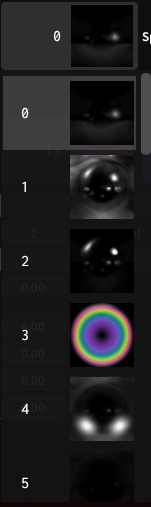
- <span style="font-size: 11pt; font-family: Arial,sans-serif; color: #000000; background-color: transparent; font-weight: 400; font-style: normal; font-variant: normal; text-decoration: none; vertical-align: baseline; white-space: pre-wrap;">Click the 3rd option, which looks like a rainbow. </span>
- <span style="font-size: 11pt; font-family: Arial,sans-serif; color: #000000; background-color: transparent; font-weight: 400; font-style: normal; font-variant: normal; text-decoration: none; vertical-align: baseline; white-space: pre-wrap;">Now, in the box below Sphere map, “Sphere Map Intensity”, change the % to any number you’d like. If you turn this too high, it’ll just go white, I’d recommend sticking below 300</span>

<span style="font-size: 11pt; font-family: Arial,sans-serif; color: #000000; background-color: transparent; font-weight: 400; font-style: normal; font-variant: normal; text-decoration: none; vertical-align: baseline; white-space: pre-wrap;"><span style="border: none; display: inline-block; overflow: hidden; width: 315px; height: 93px;">![](https://lh7-rt.googleusercontent.com/docsz/AD_4nXf1L_Mb9wwns13lpYxUXQdsOVYJq_n4SO4PBISajsFEBfSTAElNN6cZkmc5Tv08wy_3-FmA1scBTcpYxxqJK8eK2bDBZublXfCVOQkYB-j6r857IsscIhlbgM9jIUw8q3lCJ_E-teZ3VGf2nUpxXw?key=-yowPvpdJ5vtGqEUkSfukw)</span></span>